Dell XPS 16 9640 Review: Power Meets Elegance
Introduction
Choosing a 16-inch laptop in 2026 means wading through a crowded field of creator machines, gaming rigs, and mobile workstations. The Dell XPS 16 9640 sits in an interesting middle ground: it looks like a premium consumer laptop but packs enough horsepower to handle serious creative and professional workloads.
If you're comparing it against alternatives like the Lenovo P16 Gen 2 or wondering how it stacks up to Dell's own workstation-class Dell Precision 5690, this guide breaks down everything you need to know: design, performance, display quality, battery life, ports, pricing, and who this laptop is actually built for.
What Is the Dell XPS 16 9640?
The XPS 16 9640 is Dell's largest XPS laptop and effectively replaced the long-running XPS 15 line. It's built around Intel's Meteor Lake "Core Ultra" processors. It pairs them with NVIDIA's Ada Lovelace mobile GPUs, giving it a genuine dedicated-graphics option that the smaller XPS 13 and XPS 14 don't offer.
Rather than being a gaming laptop or a certified mobile workstation, the XPS 16 9640 is positioned as a creator-focused productivity machine something for photographers, video editors, developers, and professionals who want a powerful, portable laptop without the bulk of a true workstation like the Lenovo P16 Gen 2 or Dell Precision 5690.
Design and Build Quality
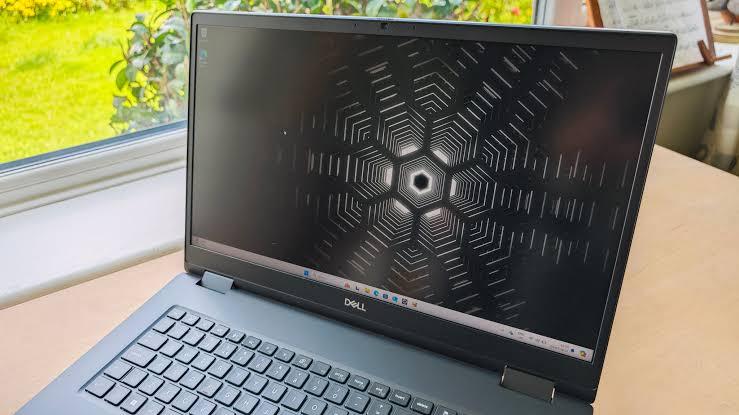
Dell kept the design language consistent with the rest of the XPS family: a machined aluminum chassis available in Platinum or Graphite, a glass haptic touchpad that blends seamlessly into the deck, and a row of touch-sensitive function keys instead of physical ones. The keyboard sits flush with the chassis, and speaker grilles flank it on either side for a clean, symmetrical look.
At roughly 0.74 inches thick and about 4.7 pounds, it's noticeably lighter and slimmer than mobile workstations in the same screen category; the Lenovo P16 Gen 2, for comparison, is over 6 pounds and more than an inch thick because it's built around ISV-certified components and heavier-duty cooling.
The minimalist design has trade-offs, though. Several reviewers noted that the flat, low-profile keyboard and invisible touchpad boundaries take some adjustment, and the capacitive function row isn't as satisfying as tactile keys for people who rely on frequent keyboard shortcuts.
Display Options
This is where the XPS 16 9640 genuinely shines. Dell offers three panel choices:
-
FHD+ (1920×1200), non-touch, up to 500 nits, 100% sRGB, variable refresh up to 120Hz
-
4K+ (3840×2400) OLED touch, up to 90Hz, 100% DCI-P3, Dolby Vision, near-instant response time
The 4K OLED panel in particular has been praised for its color accuracy, deep contrast, and sharpness a strong pick for photo and video editors who need a reliable reference display without buying an external monitor. It's genuinely one of the best screens available on a 16-inch Windows laptop right now.
Performance: CPU, GPU, and RAM
The XPS 16 9640 is powered by Intel Core Ultra 7 and Core Ultra 9 "Meteor Lake" processors, topping out with the Core Ultra 9 185H, which combines performance and efficiency cores with a dedicated NPU for on-device AI acceleration.
Graphics options range from integrated Intel Arc up to discrete NVIDIA options:
-
NVIDIA GeForce RTX 4050 (6GB, 50W)
-
NVIDIA GeForce RTX 4060 (8GB, 50W)
-
NVIDIA GeForce RTX 4070 (8GB, 60W)
Memory is soldered LPDDR5X, configurable from 16GB up to 64GB, and storage is a single M.2 PCIe Gen 4 slot, with options up to 2TB or more depending on configuration.
In real-world testing, the Core Ultra 7 155H configuration held sustained clock speeds well thanks to Dell's dual-fan cooling system, which occupies nearly half of the laptop's internal volume. That said, the RTX 4060 and 4070 models here are tuned for efficiency rather than peak output; their gaming and rendering performance trails behind higher-wattage GPUs found in dedicated workstations and gaming laptops, including the Lenovo P16 Gen 2's more powerful RTX Ada options.
How It Compares to the Lenovo P16 Gen 2
The Lenovo P16 Gen 2 is a different animal entirely. It's a certified mobile workstation built around Intel Core HX-series processors (up to a 55W Core i7-14700HX) and NVIDIA RTX Ada Generation professional GPUs, ranging from the RTX 1000 Ada up to the RTX 5000 Ada with up to 192GB of RAM. It's aimed squarely at engineers, architects, and 3D artists running CAD, simulation, and ISV-certified software where reliability and raw graphics throughput matter more than portability.
If your work depends on software like SolidWorks, AutoCAD, or professional 3D rendering pipelines, the P16 Gen 2's higher-wattage GPUs and ISV certification make it the safer choice, despite the extra weight and shorter battery life. If you want a lighter, better-looking machine for photo/video editing, coding, and everyday productivity with occasional GPU-accelerated tasks, the XPS 16 9640 is the more practical option.
How It Compares to the Dell Precision 5690
The Dell Precision 5690 is Dell's own answer to the mobile-workstation category, essentially an XPS-style chassis with workstation internals, including higher-wattage NVIDIA RTX Ada professional graphics and ISV certification for engineering and CAD applications. Independent benchmarks have shown that even the Precision 5690's 95W RTX 5000 Ada can be outpaced in some graphics workloads by other high-wattage workstation GPUs, which underscores that wattage and cooling design matter as much as the GPU model itself.
Compared to the XPS 16 9640, the Precision 5690 trades some of the XPS's sleekness for professional-grade reliability and certified drivers a worthwhile trade if your job depends on software stability, but overkill for most creative professionals and general power users.
Ports and Connectivity
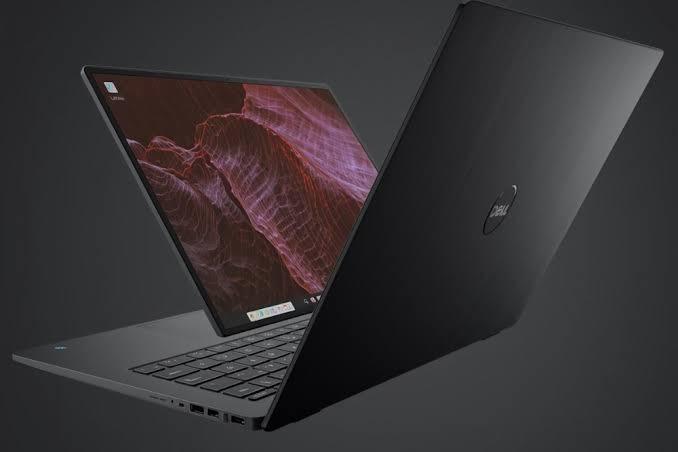
The XPS 16 9640 keeps things minimal:
-
Three USB-C ports (Thunderbolt 4, with configurations varying by GPU tier)
-
3.5mm headphone jack
-
MicroSD card reader
-
Wi-Fi 7 support
Notably absent are USB-A and HDMI ports, though Dell includes a small dongle in the box to cover both. This is a common complaint in reviews for a 16-inch laptop with plenty of internal space; the port selection feels more suited to a thinner 13- or 14-inch model.
Battery Life
Battery capacity sits at 99Wh, and real-world battery life is respectable for a discrete-GPU laptop, though it varies significantly based on display choice and workload. The FHD+ non-touch panel will get noticeably better battery life than the 4K OLED touch option. Compared to workstations like the Lenovo P16 Gen 2, which can drain in just a few hours under heavy load, the XPS 16 9640 is considerably more usable unplugged for everyday tasks.
Audio and Webcam
The quad-speaker setup, tuned with Waves MaxxAudio Pro, delivers surprisingly full sound for a laptop this thin. The 1080p webcam is serviceable for video calls but not exceptional; colors run a bit warm, and detail is soft in mixed lighting, which is fairly typical for this laptop class.
Pricing
Dell has priced the XPS 16 9640 across a wide range depending on configuration, historically starting around $1,499–$1,699 for base models and climbing toward $4,000+ for maxed-out configurations with the Core Ultra 9, RTX 4070, and 4K+ OLED display. Current listings and configurations are best checked directly on Dell's website, since pricing and available configurations shift frequently.
Pros and Cons
Pros:
-
Stunning 4K OLED display option with excellent color accuracy
-
Premium aluminum build quality
-
Strong sustained CPU performance thanks to effective cooling
-
Wi-Fi 7 and Thunderbolt 4 connectivity
-
Noticeably lighter and slimmer than mobile workstations like the Lenovo P16 Gen 2
Cons:
-
Limited port selection with no native USB-A or HDMI
-
Flat keyboard and invisible touchpad take adjustment
-
GPU options are consumer-grade, not ISV-certified like the Precision 5690
-
Battery life drops significantly under GPU load
-
Can get expensive quickly once you start upgrading display and GPU
Frequently Asked Questions
Is the Dell XPS 16 9640 good for video editing? Yes. The optional 4K OLED display, discrete RTX graphics, and up to 64GB of RAM make it a strong choice for video and photo editing, especially in DaVinci Resolve or Premiere Pro workflows that benefit from GPU acceleration.
Is the Dell XPS 16 9640 good for gaming? It can handle modern games at moderate settings, but it isn't designed as a gaming laptop first. The RTX 4050/4060/4070 configurations here run at lower TGP limits than dedicated gaming laptops, so expect solid, not exceptional, frame rates.
How does the Dell XPS 16 9640 compare to the Lenovo P16 Gen 2 for engineers? The Lenovo P16 Gen 2 is the better pick for CAD, simulation, and other ISV-certified engineering software thanks to its professional RTX Ada graphics and higher RAM ceiling. The XPS 16 9640 is better suited to creative and general productivity work.
Does the Dell XPS 16 9640 have upgradeable RAM? No. RAM is soldered LPDDR5X, so you need to choose your memory configuration at checkout;t it cannot be upgraded later.
What's the difference between the XPS 16 9640 and the Dell Precision 5690? The Precision 5690 uses workstation-class, ISV-certified NVIDIA RTX Ada graphics and is built for professional engineering and design workflows, while the XPS 16 9640 targets creators and general power users with consumer-grade RTX 40-series graphics at a lower price point.
Final Verdict
The Dell XPS 16 9640 succeeds at what it sets out to do: pack genuine creative performance into a laptop that still looks and feels like a premium consumer device. It won't replace a certified mobile workstation like the Lenovo P16 Gen 2 or Dell Precision 5690 for CAD-heavy professional work, but for photographers, editors, developers, and everyday power users who want a gorgeous display and dependable performance without the bulk, it's one of the more compelling 16-inch laptops available.
If you're deciding between these three machines, think about your actual workload first: choose the XPS 16 9640 for style and creative versatility, the Lenovo P16 Gen 2 for raw workstation power on a budget, or the Precision 5690 if certified reliability for professional engineering software is non-negotiable.
Found this comparison helpful? Share your own experience with the Dell XPS 16 9640 in the comments, or share this guide with anyone shopping for a 16-inch creator laptop.
Categorias
Leia Mais
ORDER NOW : http://healthyifyshop.com/GetSlimTide SlimTide is a weight management supplement that combines metabolism and digestive wellness support into a single formula. Some customers may find it appealing because of its emphasis on gut health and metabolic function, which is in line with current wellness trends. For More Information : ...

Businesses today face increasing pressure to improve efficiency, streamline operations, and make faster decisions. As organizations grow, managing complex processes across departments becomes more challenging. This is where SAP solutions help create a connected and data-driven business environment. However, the success of any SAP initiative depends heavily on the expertise guiding the project....

Myopia treatment in Mumbai has become increasingly important as the prevalence of nearsightedness continues to rise among children, teenagers, and adults. Myopia, commonly referred to as nearsightedness, is a vision condition that causes distant objects to appear blurry while nearby objects remain clear. It is one of the most common refractive errors worldwide and can significantly impact...

In today’s rapidly evolving world, people are becoming increasingly aware of the invisible environmental factors that influence their long-term wellness, energy levels, and internal harmony. Modern lifestyles expose the body to a variety of external elements that can quietly accumulate over time, making awareness and preventive health thinking more important than ever. This growing shift...

Halal certification for restaurants USA is becoming increasingly important as more consumers look for restaurants that serve food prepared according to recognized halal standards. Whether you own a fine dining restaurant, café, fast-food outlet, food truck, catering service, or cloud kitchen, halal certification demonstrates your commitment to quality, food safety, and halal...