Lenovo Yoga 9i (2026): Full Review & Buying Guide
Introduction
Picking a premium convertible laptop in 2026 isn't easy. There are more OLED screens, more "AI PC" badges, and more marketing buzzwords than ever, and it's genuinely hard to tell which machine actually earns its price tag. The Lenovo Yoga 9i has quietly built a reputation as one of the most consistently well-engineered 2-in-1 laptops on the market, and the newest Gen 11 Aura Edition model gives Lenovo fans plenty to get excited about.
In this guide, you'll learn exactly what the Yoga 9i offers in its current generation, how its display, performance, and design hold up in daily use, and how it compares to two very different machines: Lenovo's own gaming-focused Legion 7i, and the beastly Asus ROG Strix Scar 18. By the end, you'll know whether the Yoga 9i deserves a spot on your shortlist and who it's actually built for.
What Is the Lenovo Yoga 9i?
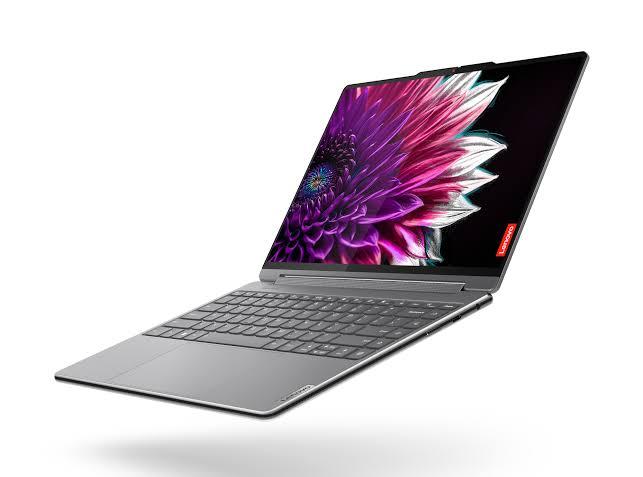
The Yoga 9i is Lenovo's flagship 2-in-1 convertible, sitting at the top of the consumer Yoga lineup. Unlike Lenovo's "Yoga Pro" series, which has shifted toward creator and desktop-replacement territory, the standard Yoga 9i keeps its identity as a compact, versatile convertible built for everyday productivity, note-taking, and light creative work.
The latest version, the Yoga 9i 2-in-1 Aura Edition (Gen 11), was unveiled at Mobile World Congress 2026 in Barcelona. It keeps the formula that made earlier generations popular a 360-degree hinge, a rotating soundbar, and a metal chassis with rounded "Comfort Edge" corners while refining the display, the pen experience, and the internal hardware.
Key Specifications
Here's a look at what the current-generation Yoga 9i brings to the table:
-
Processor: Intel Core Ultra 7 355 (Intel's third-generation AI-accelerated architecture)
-
Graphics: Integrated Intel graphics (no discrete GPU)
-
Display: 14-inch 2.8K (2,880 x 1,800) PureSight Pro OLED, 120Hz variable refresh rate, multi-touch
-
Memory: Up to 32GB LPDDR5X at 7,467MHz
-
Storage: Up to 2TB PCIe Gen 4 SSD
-
Battery: 70Wh
-
Platform: Copilot+ PC, Windows 11
-
Starting Price: $1,949 (available from May 2026)
The headline new feature for this generation is Canvas Mode, enabled through the bundled Yoga Pen Gen 2 case. When the case is attached to the laptop's lid and the device is laid flat on a desk, it creates a slight incline that mimics a drafting table, making it more comfortable to sketch, annotate, or take handwritten notes. It's a small touch, but it's the kind of detail that has made this series a favorite among reviewers for years.
Design and Build Quality
The Yoga 9i has always leaned into a premium, understated look, and the Gen 11 model doesn't change that formula. It keeps the rounded metal edges, the four-mode hinge (Laptop, Tablet, Tent, and Stand), and the signature rotating soundbar that flips speakers into the ideal position no matter how the display is oriented.
Because it remains a 14-inch machine, it's easy to carry around campus, on a commute, or between meeting rooms a meaningful advantage over larger, heavier convertibles. The tradeoff is a smaller footprint for typing and multitasking compared to 16-inch alternatives, so if you regularly juggle several windows side by side, that's worth factoring into your decision.
Display and Everyday Performance
The 14-inch 2.8K OLED panel remains the star of the show. It's bright, color-accurate, and sharp enough for both photo editing and video streaming, while the 120Hz refresh rate keeps everyday scrolling and note-taking feeling fluid. Since the Yoga 9i relies on integrated graphics rather than a discrete GPU, it's built for productivity, content consumption, and light creative work rather than serious gaming or 3D rendering.
With 32GB of RAM and a Copilot+ certification, the laptop is well-equipped to handle Windows 11's on-device AI features, along with typical workloads like browser-heavy multitasking, video calls, document editing, and photo touch-ups. Battery life should benefit from the efficiency gains of the newer Intel Core Ultra chip, though as with any new laptop generation, real-world endurance will vary depending on brightness settings and workload.
How Does It Compare? Yoga 9i vs. Legion 7i vs. ROG Strix Scar 18
It's tempting to compare every premium laptop against every other premium laptop, but the truth is the Yoga 9i, the Lenovo Legion 7i, and the Asus ROG Strix Scar 18 are built for very different people. Understanding those differences will save you from buying the wrong machine.
Lenovo Yoga 9i: The Everyday Convertible
As covered above, the Yoga 9i is a 14-inch 2-in-1 built around portability, display quality, and pen input. It's the right choice for students, professionals, and creatives who want a comfortable everyday laptop with occasional sketching or note-taking capability — not a gaming rig.
Lenovo Legion 7i: The Balanced Gaming Powerhouse
The Lenovo Legion 7i occupies a different niche entirely: a 16-inch gaming laptop built for players who want strong performance in a relatively compact, lightweight chassis. The current-generation Legion 7i pairs an Intel Core Ultra HX processor with an Nvidia GeForce RTX 5070 GPU carrying 12GB of VRAM a notable upgrade over the 8GB found in the previous generation, which had been a common complaint among enthusiasts.
Its 16-inch 2.5K OLED display runs at up to 240Hz, and the aluminum chassis keeps weight around 4.4 lbs, making it one of the more travel-friendly high-performance gaming laptops available. The Legion 7i also supports upgradeable RAM, dual M.2 storage slots, and a Hyper Cooling system that adapts to workload in real time. If you want serious 1440p gaming performance without carrying a desktop-sized laptop, the Legion 7i is a strong middle-ground option more powerful than the Yoga 9i, but more portable than the machine below.
Asus ROG Strix Scar 18: The Desktop-Replacement Flagship
If raw power is the priority, the Asus ROG Strix Scar 18 sits at the opposite end of the spectrum from the Yoga 9i. The 2026 model is built around an Intel Core Ultra 9 290HX Plus processor and configurations up to an Nvidia GeForce RTX 5090 Laptop GPU with 24GB of GDDR7 VRAM components that push this machine firmly into desktop-replacement territory.
Asus also introduced an 18-inch 4K Mini LED display running at 240Hz with ROG Nebula HDR and Nebula ELMB motion-clarity technology, alongside a total system power ceiling of up to 320W, a significant jump from the previous generation's 255W. The cooling system was redesigned with a larger vapor chamber and higher-airflow fans to sustain that power draw, and the chassis retains ASUS's tool-less upgrade design for RAM and SSD access.
In short: the Scar 18 is built for gamers, creators, and power users who need maximum performance and are willing to accept a larger, heavier, and pricier machine in exchange. It is not a portable everyday laptop in the way the Yoga 9i is.
Quick Comparison Table
|
Feature |
Lenovo Yoga 9i |
Lenovo Legion 7i |
Asus ROG Strix Scar 18 |
|
Best for |
Everyday productivity & note-taking |
Portable gaming performance |
Maximum gaming/creator power |
|
Screen size |
14" |
16" |
18" |
|
Display |
2.8K OLED, 120Hz |
2.5K OLED, up to 240Hz |
4K Mini LED, 240Hz |
|
GPU |
Integrated only |
RTX 5070 (12GB) |
Up to RTX 5090 (24GB) |
|
Form factor |
2-in-1 convertible |
Traditional gaming laptop |
Large gaming laptop |
|
Starting price |
$1,949 |
~$1,999+ |
Premium flagship pricing |
Pros and Cons of the Lenovo Yoga 9i
Pros:
-
Excellent 2.8K OLED display with strong brightness and color accuracy
-
Genuinely useful 2-in-1 versatility with four hinge modes
-
New Canvas Mode adds real value for sketching and note-taking
-
Compact, lightweight, and easy to travel with
-
Copilot+ certification for on-device AI features
Cons:
-
No discrete GPU, so it isn't suited for gaming or heavy 3D work
-
14-inch screen may feel cramped for heavy multitaskers
-
Premium pricing compared to non-convertible ultrabooks
-
Real-world battery life will vary and needs independent testing to confirm
Frequently Asked Questions
Is the Lenovo Yoga 9i good for gaming? Not really. Since it relies on integrated Intel graphics rather than a discrete GPU, the Yoga 9i is built for productivity and creative tasks, not gaming. If gaming is a priority, the Legion 7i or Asus ROG Strix Scar 18 are far better suited.
What's the difference between the Yoga 9i and the Legion 7i? The Yoga 9i is a 14-inch 2-in-1 convertible aimed at everyday users, students, and light creatives. The Legion 7i is a 16-inch traditional gaming laptop with a discrete Nvidia GPU, built for players who want strong gaming performance in a relatively portable chassis.
Does the Yoga 9i support a stylus? Yes. The Gen 11 model ships with the Yoga Pen Gen 2, which also doubles as a case that enables the new Canvas Mode for a more comfortable drawing angle.
When does the new Yoga 9i become available, and how much does it cost? The Yoga 9i 2-in-1 Aura Edition (Gen 11) became available starting in May 2026, with a starting price of $1,949 in the United States. As with most Lenovo launches, discounts tend to appear within weeks of release.
Conclusion
The Lenovo Yoga 9i continues to do what it has always done well: pair a gorgeous OLED display with genuinely useful 2-in-1 flexibility in a compact, travel-friendly chassis. It isn't trying to compete with gaming laptops like the Legion 7i or the Asus ROG Strix Scar 18 — and it doesn't need to. For people who want a premium everyday laptop with pen support and top-tier visuals, the Yoga 9i remains one of the strongest options on the market.
If portability and versatility matter more to you than raw gaming horsepower, the Yoga 9i is worth serious consideration. But if you're chasing frame rates or need a discrete GPU for creative rendering, the Legion 7i or the Strix Scar 18 will serve you better.
What matters most to you in a laptop portability, display quality, or raw performance? Share your thoughts in the comments, and pass this guide along to anyone weighing these options before their next laptop purchase.
Categories
Read More
It has now evolved as one of the best training institutes in the field of IT due to its focus on actual learning, skills requirements, and education which aids career progression. In this era of changing market scenarios very fast, employers look for candidates who are not only knowledgeable but also experienced, have good analyzing abilities and possess confidence at the time of interviews....

Golf is more than just learning how to swing a club. For young athletes, it teaches patience, discipline, confidence, and focus both on and off the course. That is why many parents today are choosing Junior Golf Coaching in Alberta to help their children grow into confident and competitive players. Under the guidance of experienced professionals like Harmeet Kahlon, young golfers...

Technology has become an essential part of modern life, helping people stay connected, productive, and healthy. From tracking daily fitness goals to enjoying high-quality audio on the go, wearable devices and wireless accessories have transformed how we interact with technology throughout the day. Two products that perfectly complement this connected lifestyle are the HUAWEI FreeBuds 7i...
Modern lifestyles often leave little room for lengthy trips to training facilities or outdoor practice venues. As schedules become more demanding and comfort takes greater priority, many enthusiasts are seeking alternatives that fit seamlessly into residential and commercial environments. One solution gaining remarkable attention is the Indoor Golf Simulator Dubai concept, which combines...

Finding the perfect gift for the special women in your life can feel overwhelming. Whether you’re shopping for your mum, wife, sister, best friend or a colleague, you want something that feels meaningful, unique and memorable. That’s why handmade gifts have become increasingly popular across the UK. Beautifully crafted items add a personal touch and offer something far...